
Connect Claude to Vocal Video
Add Vocal Video as a connector and Claude can read your collector responses, draft and send invitations, tidy up storyboards, and hand you share links — by asking. No API key, no code. The connector lives on your Claude account, so it works in Claude on the web and in Claude Desktop.
1. Add the connector
In Claude, open Customize → Connectors, click +, then Add custom connector.
- Name: Vocal Video
- Remote MCP server URL:
https://vocalvideo.com/api/mcp
Leave Advanced settings closed — no client ID or secret is needed. Click Add.
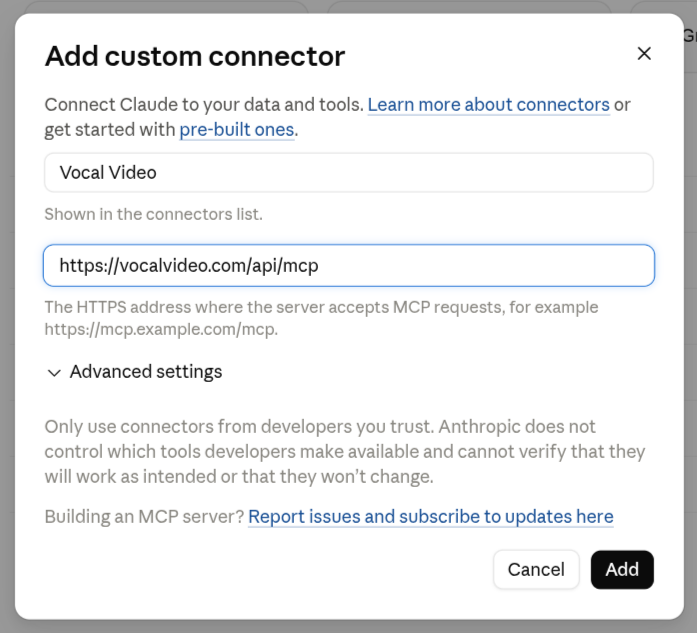
On a Team or Enterprise plan an Owner adds it first under Organization settings → Connectors → Add → Custom → Web; each member then finds it under Customize → Connectors and clicks Connect. Free plans allow one custom connector.
2. Approve access
Claude opens a Vocal Video sign-in. Log in, pick the workspace to connect if you belong to more than one, and click Allow. That's the whole handshake: Claude holds its own short-lived token from here on, renews it itself, and never sees your password.
Claude acts as you, in that one workspace. Every person who connects goes through the same sign-in with their own account — there's nothing to share.
3. Use it in a chat
In a chat, click + → Connectors and switch on Vocal Video. Then ask:
- "Which replies in my Pricing collector mention ROI?"
- "Star the three strongest answers to the second question in the Q3 collector."
- "Write an invitation for the Customer Stories collector and send it to the people in this list."
- "Tighten the pauses in the Acme testimonial and mute the filler words."
- "Give me the share link for the Acme testimonial."
Anything that emails real people previews first and asks before it sends.
What Claude can reach
Out of the box the connector loads the collect and produce tools —
collectors, invitations, replies, storyboards, templates. Add ?toolsets= to
the URL to change the mix:
| Remote MCP server URL | Loads |
|---|---|
https://vocalvideo.com/api/mcp |
collect + produce (the default) |
https://vocalvideo.com/api/mcp?toolsets=collect,distribute |
collectors and replies, plus galleries, share links, and embed codes |
https://vocalvideo.com/api/mcp?toolsets=all |
everything, including account usage and brand settings |
Fewer toolsets keeps Claude sharper; all is fine if you're not sure. The
MCP reference lists what each one contains. To change it
later, remove the connector and add it again with the new URL.
If it doesn't connect
- Claude never opens the sign-in — check the URL is exactly
https://vocalvideo.com/api/mcpand that Advanced settings are empty. - Sign-in works but every request fails — API access isn't enabled on your account. The MCP server is included on Essential plans and up. Get in touch and we'll sort it out.
Disconnect
Remove Vocal Video from Customize → Connectors in Claude. Its token stops working immediately.